

All blog posts
Explore the world of design and learn how to create visually stunning artwork.

Overemployed Machine Learning Engineer: The Honest 2026 Feasibility Guide
July 1, 2026 | by Ian Adair

Overemployed Solutions Architect: The Honest 2026 Feasibility Guide
June 5, 2026 | by Ian Adair

Best Mouse Jiggler Chrome Extension in 2026: Honest Picks That Actually Work
June 3, 2026 | by Ian Adair

Best Mouse Jiggler for Mac in 2026: Free Apps That Actually Work
June 1, 2026 | by Ian Adair

Overemployed Data Engineer: The Honest Feasibility Guide for 2026
May 29, 2026 | by Ian Adair

Overemployed Cloud Engineer: The Honest Feasibility Guide for 2026
May 27, 2026 | by Ian Adair

Overemployed Financial Analyst: The Honest Feasibility Guide for 2026
May 26, 2026 | by Ian Adair

Overemployed DevOps Engineer: The Honest Feasibility Guide for 2026
May 25, 2026 | by Ian Adair

Overemployed Data Analyst: The Honest Feasibility Guide for 2026
May 24, 2026 | by Ian Adair

Moonlighting Policy: What Your Employer Can (and Can’t) Restrict in 2026
May 23, 2026 | by Ian Adair

Overemployed Machine Learning Engineer: The Honest 2026 Feasibility Guide
Machine learning engineers are among the most viable candidates for overemployment in 2026. Project-based deliverables, asynchronous training runs, remote-first culture, and AI productivity tools that have made senior MLEs three to five times more output-capable mean two full-time roles are genuinely achievable, provided you pick complementary role types and manage detection risks carefully.
The question of whether a machine learning engineer can hold two full-time jobs at once has moved from theoretical to practical in a very short window. Three years ago, the seat-time culture and on-site GPU access requirements at most ML shops made this a fringe idea. In 2026, the picture looks completely different. Model training happens overnight on cloud GPUs. Pull requests are reviewed asynchronously across time zones. Copilot, Cursor, and Claude have compressed weeks of boilerplate work into hours. Meanwhile, demand for ML talent keeps outpacing supply, salaries have climbed into territory that used to belong exclusively to hedge fund quants, and remote-first hiring is the norm at most AI-native companies.
The catch is that “machine learning engineer” is not a single job. It covers at least four very different working styles, and the feasibility of overemployment varies enormously between them. A production ML engineer shipping recommendation model updates on a two-week sprint cycle lives in a completely different world from a research scientist grinding on a novel diffusion architecture. This guide breaks down which flavor of MLE work is actually compatible with holding two jobs, what the income math looks like at each level, the detection risks unique to this role, and how to structure J1 and J2 to make the whole thing sustainable.
ML Engineer Subtypes and OE Feasibility
Before deciding whether to pursue overemployment, you need to be honest about which type of ML engineer you actually are. The four broad categories below have very different day-to-day rhythms, and only some of them fit the overemployed model.
| Role Type | Typical Work Style | OE Feasibility Score | Key Challenge |
|---|---|---|---|
| Applied/Production ML Engineer | Project-based, async, clear deliverables | High | Model versioning overlap |
| MLOps / Platform ML Engineer | Infrastructure, pipelines, async | High | GPU cluster scheduling |
| Research Scientist (ML) | Open-ended, paper-heavy, collab-dense | Low | IP ownership conflicts |
| AI Product Engineer | Sprint-based, product cycles | Medium-High | Demo availability conflicts |
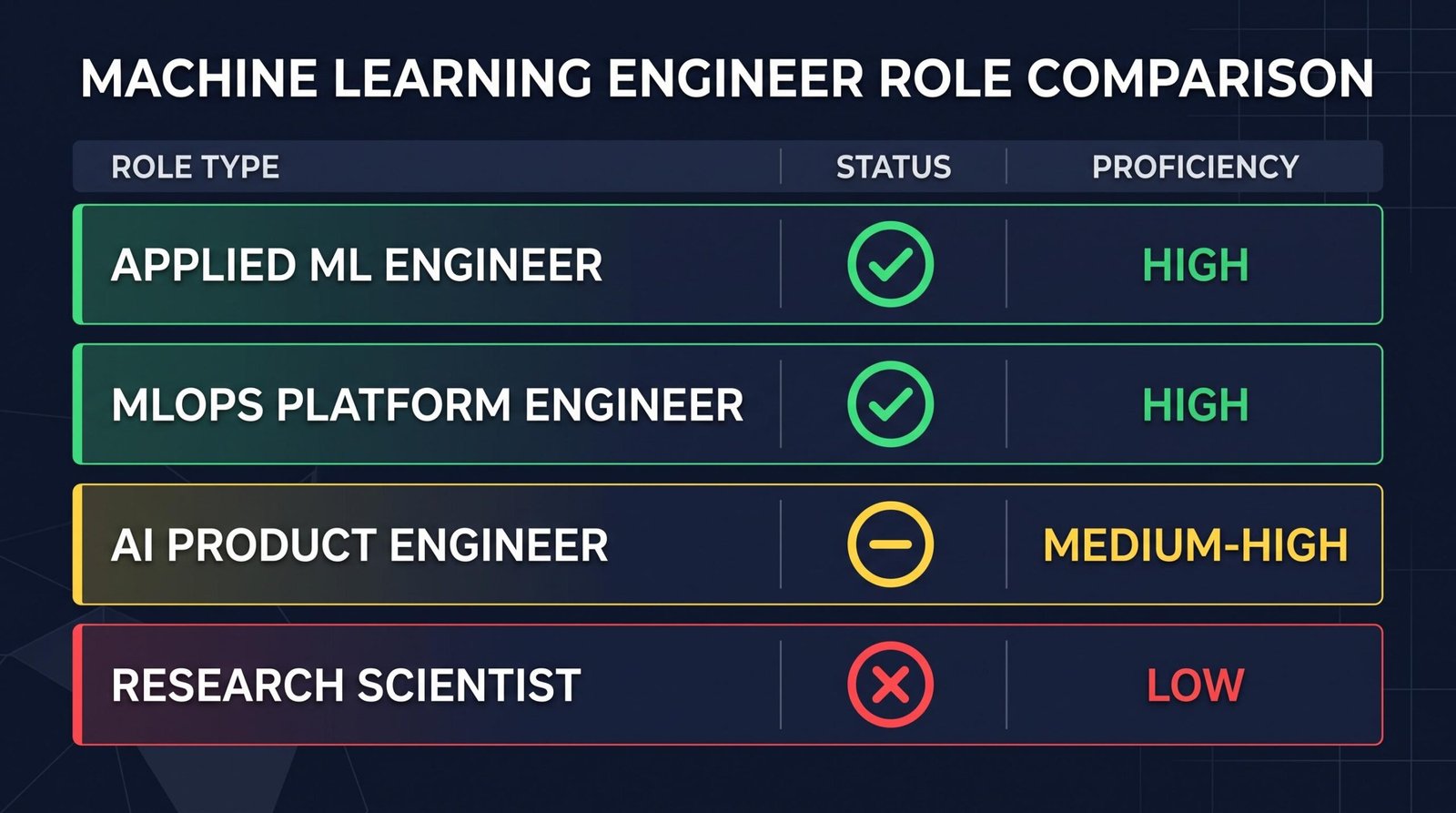
Applied and production ML engineering is the sweet spot. Your work is measured in shipped models, evaluation metrics, and pipeline reliability. Nobody cares whether you spent nine hours or three on a given day, only whether your recall improved and your latency stayed under budget. MLOps and platform work is even better in some ways because so much of the job is infrastructure that runs itself once configured. Kubernetes clusters, feature stores, and CI pipelines do not require your continuous attention.
Research scientist roles are a different animal. Papers get written in tight collaboration with other researchers. Whiteboard sessions happen constantly. Your name goes on publications that reveal your institutional affiliation, which creates immediate conflict risk if you are simultaneously employed elsewhere in the field. The IP ownership problems alone would make dual employment a legal and reputational disaster. AI product engineering sits in the middle. You have sprint cycles and demo obligations that force real-time presence, but between milestones there is plenty of async breathing room.
Why ML Engineers Are Natural OE Candidates
The reason MLE overemployment has gone from impossible to obvious in 2026 comes down to five structural changes that all happened at once. The work itself is fundamentally asynchronous. Training runs take hours or days and do not need you sitting at a terminal watching them. Hyperparameter sweeps and evaluation harnesses run in the background. Data preprocessing jobs finish overnight. The parts of the day where you actually need to be actively coding or thinking are compressed into a few high-leverage windows, leaving the rest of the calendar free for a second employer.
Compensation makes the math irresistible. According to machine learning engineer salary data on Levels.fyi, the median total compensation for a mid-level MLE sits at $272,000 in June 2026, with the 75th percentile at $371,250 and the 90th percentile at $487,000. At Google specifically, MLE compensation runs from $199,000 at L3 to $743,000 at L7, with a median around $302,000. Two of these at once puts you in seven-figure territory without needing to found a startup or wait for an exit.
The productivity multiplier from AI coding tools is the third structural shift. A senior MLE using Cursor with Claude Sonnet, Copilot for boilerplate, and internal LLM assistants for code review can output the volume of work that a small team produced three years ago. Debugging PyTorch training scripts that used to take a full afternoon now takes twenty minutes. Writing evaluation notebooks is a matter of describing what you want. This is the actual reason overemployment has become viable for skilled MLEs in a way it simply was not in 2022, and it is why the trend among overemployed software engineers has expanded so quickly into specialized technical roles.
Remote-first culture at AI companies means nobody expects you at a desk. Slack presence is optional. Camera-on meetings have become the exception rather than the rule. Distributed teams across five time zones normalize the idea that not everyone is available at the same hours. Finally, demand for MLE talent still wildly outstrips supply. The BLS projects computer and information technology occupations to grow much faster than the average through 2034, with roughly 317,700 openings per year across IT fields. Recruiters are cold-DMing every MLE with a public GitHub profile, which means finding a second offer is often a matter of returning a message you already received.
The Income Math: What Two MLE Salaries Look Like
The financial case is the entire point for most people looking at overemployment. When you run the numbers on doubling a machine learning engineer salary, the acceleration on your net worth timeline gets serious. A single year of overemployment at senior level generates more wealth than five years of aggressive saving at a single job for most engineers.
| Experience Level | Single J Salary (50th %ile) | Dual OE Total | Annual Wealth Acceleration |
|---|---|---|---|
| Mid-Level (5 yrs) | $272,000 | $544,000 | +$272,000/yr |
| Senior (8 yrs) | $371,000 | $742,000 | +$371,000/yr |
| Staff/Principal | $487,000 | $974,000 | +$487,000/yr |
Salary data comes from Levels.fyi as of June 2026 and reflects total compensation including base, bonus, and stock. The wealth acceleration column is what your extra earnings mean after federal and state taxes on the incremental income, which is why understanding the tax situation matters before you sign J2. High marginal rates on your second income mean the take-home is less than a naive doubling would suggest, but the after-tax uplift is still transformative. Before you accept a second offer, you should also confirm whether you can legally hold two full-time jobs in your state and contract situation, because a few edge cases involve non-compete clauses or exclusivity terms that create real risk.
The other consideration is stock vesting. If both jobs pay a meaningful chunk of comp in RSUs, and both grants vest quarterly, you are essentially compounding two four-year vesting schedules against each other. The Bureau of Labor Statistics noted that five of the fifteen fastest-growing occupations are in computer and mathematical fields, which correlates with the equity appreciation that MLE employers have historically delivered.
Detection Risks Specific to ML Engineers
Most overemployment guides talk about generic detection risks like calendar conflicts and Slack timing. ML engineers face several category-specific risks that other software roles do not, and ignoring them is how careers get torched. The Soham Parekh case became a cautionary reference point across the AI community after The Pragmatic Engineer covered how one engineer allegedly held roles at multiple AI startups simultaneously while failing to deliver work at any of them. That kind of behavior is what most people picture when they hear “overemployed engineer,” but it is a completely different thing from ethical overemployment. Ethical OE means delivering full value to both employers, meeting all deadlines, and doing the actual work. It is not fraud. The distinction matters enormously for your reputation in a small industry where everyone knows everyone.
The specific detection surfaces for ML engineers include:
- MLflow and Weights & Biases experiment tracking: Both employers may use the same experiment tracking platforms, and overlapping run timestamps from the same laptop or IP can reveal dual employment if either team ever cross-references. Always use separate accounts, ideally on separate machines, and consider using tracking servers that are hosted only on the employer’s infrastructure.
- Git commit history timing: Commit patterns tell a story. If your J1 GitHub Enterprise account shows commits at 10am and 2pm while your J2 Bitbucket account shows commits at 10:30am and 2:30pm every day, someone doing a security audit will notice. Space your work, use separate SSH keys, and avoid identical commit patterns.
- Hugging Face profile leakage: Never push models from both jobs to the same public Hugging Face profile. This is one of the fastest ways for two employers to discover each other. Keep personal projects on a personal profile and use employer-controlled organizational accounts for work models.
- Internal GPU and TPU cluster conflicts: If both employers use shared cloud GPU pools like Coreweave or Lambda, and your usage patterns show back-to-back allocation across two accounts on the same underlying nodes, cloud provider account managers occasionally notice. This is edge-case but real.
- Benchmark paper co-authorship: If your name appears on a public arXiv paper affiliated with Employer A, and you accept a role at Employer B in the same subfield, anyone doing due diligence on you will find both. Be careful about publishing while dual-employed, especially in narrow subfields where the reviewer pool overlaps with your employers’ research teams.
The overarching principle is that ML engineering leaves more public and semi-public traces than most software work. Papers, model releases, blog posts, conference talks, and public benchmarks all create a paper trail that can connect two roles you were hoping to keep separate. Treat your online presence as adversarial and assume any determined recruiter or security team could trace it.
The OE ML Engineer Playbook
Making overemployment work as an MLE comes down to role pairing, tool isolation, and disciplined meeting management. The single most important decision is how you pair your two roles. The ideal pairing has one anchor job and one flexible job. The anchor is usually a stable applied ML role at a large company with clear deliverables and predictable review cycles. The flexible role is often an MLOps contract or a small AI startup gig with less structure and more async work. This pairing is the opposite of what most people do wrong, which is taking two competing full-time roles at similar-stage companies and then getting crushed when both hit crunch periods simultaneously.
Tool isolation is non-negotiable. Two laptops, two phones, two Slack accounts on separate browser profiles, two GitHub accounts with different SSH keys, two Google accounts, two calendars that you personally reconcile every morning. If you use Cursor or Copilot, keep separate installs pointing at separate accounts because these tools log context that could theoretically leak. Never sign into a J2 tool on a J1-issued device, and vice versa. This sounds paranoid because it is, and paranoia is the correct default posture.
Meeting management is where most people fail. The rule is that no two meetings ever overlap, ever. You use a personal calendar tool like Reclaim or Motion to sync both work calendars into a single view. Standups get consolidated to fifteen minutes with camera off when possible. You aggressively push for async written updates over sync check-ins. Before you sign J2, read your J1 contract carefully and understand the non-compete and moonlighting clause language. Some contracts prohibit any outside employment, others only prohibit competing work, and a few say nothing at all. This is the single legal thing worth spending money on a lawyer to review.
The broader OE playbook translates well from adjacent technical roles. The strategies used by overemployed data engineers around pipeline monitoring and async work map almost directly onto MLE workflows, and reading through those guides will save you from reinventing solutions to problems others have already solved.
How to Find Your Second ML Job
Landing J2 is easier for MLEs than for almost any other role because the demand imbalance is so extreme. Your inbox is probably already full of recruiter messages you have been ignoring for years. The trick is filtering for the right type of role rather than the highest-paying one. For J2, you specifically want async-heavy, low-meeting, remote-first, ideally with a written communication culture. Interview loops that emphasize take-home work over live coding are a signal that the team runs async.
The best places to look for MLE second jobs are ML-specific job boards like ai-jobs.net and mlfeed, plus AngelList/Wellfound for startup roles that tend to have less rigid schedules. Remote-only boards like WeWorkRemotely and Remote OK filter down to the async cultures you want. For contract work, Toptal and Braintrust have strong MLE pipelines and let you set your own hours explicitly. LinkedIn is fine for volume but low signal on culture, and you will spend more time filtering than you save by using it. If this is your first attempt at running two jobs simultaneously, working through a structured guide on how to get your first second job will save you weeks of trial and error.
What you tell recruiters is straightforward: you are exploring new opportunities, you have flexibility on start dates, and you prefer remote-first roles. You do not mention J1. You do not lie if directly asked whether you have another job, but nothing in a normal recruiter conversation requires you to volunteer that information. Interview scheduling requires care because you will need to book J2 loops during J1 hours. Use PTO strategically, and for early-stage screens ask for evenings or lunch slots. Most recruiters are flexible on this because they are grateful you are engaging at all.
The J2 interview process itself is the same one you have run before: ML system design, coding problems in Python and often PyTorch, model evaluation deep-dives, and behavioral rounds. Nothing about being currently employed changes how you prepare. Practice on your usual sites, warm up on a few LeetCode ML questions, and treat it like any other interview loop. The main difference is that you should probably not push for aggressive counteroffers or extended negotiations, because the goal is a smooth start date without red flags in the recruiter’s memory.
Frequently Asked Questions
Can a machine learning engineer legally work two jobs at the same time?
In most US states, yes. Employment is at-will and no federal law prohibits multiple concurrent jobs. The constraints come from your employment contract, which may include non-compete clauses, moonlighting restrictions, or exclusivity terms. Some ML roles at defense contractors or financial firms have stricter clauses. Always read your contracts and consider a one-hour consult with an employment lawyer before signing J2, particularly around IP ownership language that could affect both employers.
What types of ML engineer roles are best for overemployment?
Applied and production ML engineering roles work best because they are deliverable-based, async, and light on meetings. MLOps and platform ML roles are equally viable. AI product engineering works with more effort due to demo cycles. Research scientist roles are the worst fit because they involve heavy collaboration, publication IP conflicts, and open-ended work that expands to fill available time. Match your J2 choice to the async intensity of your J1 to avoid crunch overlaps.
How much can a machine learning engineer make with two jobs?
Based on Levels.fyi June 2026 data, a mid-level MLE running two jobs at median comp earns about $544,000 total. A senior-level dual-employed MLE reaches $742,000. Staff and principal-level engineers can clear $974,000 or more before considering equity refreshes and bonuses. Actual take-home depends on marginal tax rates in your state, but even after taxes, the after-tax uplift on the second income typically ranges from $130,000 to $250,000 annually.
How do ML engineers get caught when overemployed?
The most common detection paths are calendar conflicts, IP address overlaps on shared platforms like Hugging Face, Weights & Biases, or MLflow, LinkedIn changes that show up on recruiter tools, mutual acquaintances noticing you at two conferences representing different employers, and background check re-verifications that catch overlapping employment dates. Publishing papers while dual-employed is another major risk because affiliation lines create permanent public records that anyone can search.
Should I disclose my second job to my employer?
Generally no, unless your contract explicitly requires it. Voluntary disclosure removes your negotiating leverage, exposes you to termination risk, and gives HR a reason to scrutinize your work more closely. If your J1 contract requires disclosure of outside work, the calculus changes and you should weigh the risk carefully. Disclosure is sometimes appropriate for consulting work paid to your LLC that does not compete with your employer, but full-time W-2 concurrent employment is almost never worth disclosing.
Is the overemployed machine learning engineer lifestyle sustainable long-term?
For many engineers, two to four years is the sustainable window. The pattern that works is running OE hard for a defined period, saving aggressively, then downshifting to one job or moving to consulting once you have compressed a decade of savings into a shorter timeframe. Burnout risk is real, and the discipline required to isolate tools, manage meetings, and maintain quality at both jobs is exhausting. Set a target net worth or timeline before you start.